
How to Buy a Steam Gift Card with Bitcoin in 2026
If you're holding Bitcoin and want to top up your Steam Wallet, you're in the right place. While Steam itself doesn't accept crypto directly, you can still buy a Steam gift card with Bitcoin through trusted third-party platforms like Refillarena — and have a redeemable code in your inbox within minutes. In this guide, we'll explain why this works, walk through exactly how to buy a Steam gift card with bitcoin, and answer the most common questions about paying for games, DLC, and Steam Wallet funds using crypto.Can You Pay for Steam Directly with Bitcoin?
Not anymore. Steam accepted Bitcoin as a payment method briefly back in 2017 but dropped it due to price volatility and high transaction fees. Today, Steam's official payment options are limited to cards, PayPal, and select local payment methods — crypto isn't one of them. That's where gift cards come in. A Steam gift card is essentially a prepaid code that adds funds directly to your Steam Wallet, and it can be bought with Bitcoin through crypto-friendly marketplaces, even though Steam itself can't process the crypto payment.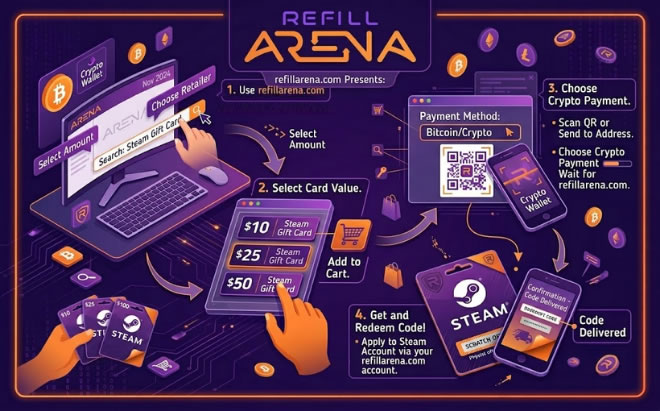
Why Buy a Steam Gift Card with Bitcoin
Buying a Steam gift card with crypto solves the gap between your crypto wallet and Steam's checkout.Here's why it's worth doing:
• Spend crypto on games: turn BTC into Steam Wallet balance you can use on any game, DLC, or in-game purchase.
• No bank or card needed: useful if you don't want to link a bank account or card to your Steam account.
• Privacy-friendly: many crypto gift card purchases require no account or ID verification.
• Works globally: ideal if Steam's local payment options are limited or unavailable in your country.
• Instant delivery: codes are typically delivered to your email within minutes of payment confirmation.
How to Buy a Steam Gift Card with Bitcoin on Refillarena
Refillarena lets you buy Steam gift cards with Bitcoin and other cryptocurrencies across 190+ countries, with instant digital delivery and no need for a traditional bank card.Here's the step-by-step process:
1. Choose your Steam gift card. Head to the Steam category on Refillarena and select the denomination and region that matches your Steam account's wallet currency.
2. Add it to your cart and select crypto payment. At checkout, choose Bitcoin (or another supported cryptocurrency) as your payment method.
3. Send payment. You'll receive a BTC wallet address and QR code. Send the exact amount shown from your wallet or exchange.
4. Wait for confirmation. Once the transaction confirms on the blockchain, your order is processed automatically.
5. Receive your code by email. Your Steam gift card code arrives in your inbox — ready to redeem on the Steam client or website.
6. Redeem on Steam. Log in to Steam, go to your account, select “Redeem a Steam Wallet Code,” and enter the code to top up your balance.
Other Cryptocurrencies You Can Use
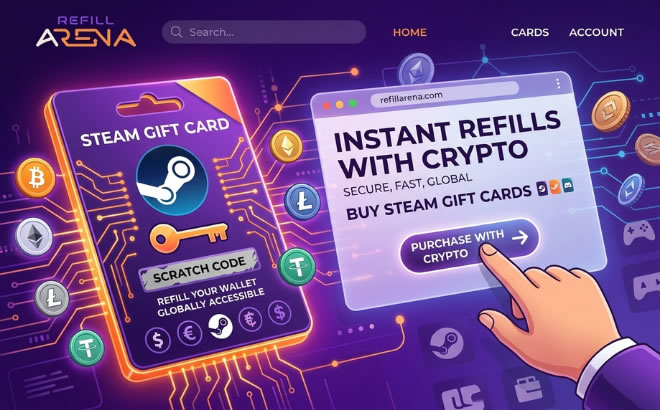
Bitcoin isn't your only option. If you'd rather pay for a Steam gift card with crypto using a different coin, Refillarena also supports popular options including Ethereum (ETH), USDT, Litecoin (LTC), and several other major cryptocurrencies — so you can use whatever's sitting in your wallet.Tips for Buying Steam Gift Cards with Crypto:
- Match the region: make sure the gift card's region matches your Steam account's country to avoid redemption issues.
- Double-check the wallet address: crypto transactions can't be reversed, so always confirm the address and network before sending.
- Account for price movement: BTC prices can shift quickly, so complete payment promptly once you receive your quote.
- Save your code: keep a copy of your gift card code and order confirmation until it's successfully redeemed.
How to Buy Steam Gift Card with Bitcoin & Crypto
FAQ
Can I buy a Steam gift card with Bitcoin directly on Steam?No. Steam stopped accepting Bitcoin in 2017. To use Bitcoin, you'll need to buy a Steam gift card or wallet code through a third-party platform like Refillarena, then redeem it on Steam.
Is it safe to buy a Steam gift card with bitcoin?
Yes, as long as you use a reputable platform. Stick to established services with instant delivery and clear refund/support policies, and always verify the wallet address before sending payment.
How fast will I receive my Steam code?
After your Bitcoin transaction is confirmed on the blockchain, codes are typically delivered to your email within minutes.
Do I need an account or ID to buy a Steam gift card with crypto?
On many crypto-friendly platforms, including Refillarena, you can complete a purchase without creating an account or submitting ID, making it a quick, low-friction option.
What if I send the wrong amount of Bitcoin?
Always send the exact amount shown at checkout. If you're unsure, contact customer support before sending payment, since crypto transactions cannot be reversed once confirmed.
Ready to Top Up Your Steam Wallet with Bitcoin?
Buying a Steam gift card with Bitcoin is one of the simplest ways to turn your crypto into gaming credit, no bank cards, no waiting days for a transfer, and no need to link payment details to your Steam account. With instant digital delivery and support across 190+ countries, Refillarena makes it easy to go from BTC to Steam Wallet balance in just a few minutes.
Browse the full selection of Steam gift cards on Refillarena and pay with Bitcoin or your preferred cryptocurrency today.Browse the full selection of Steam gift cards on Refillarena and pay with Bitcoin or your preferred cryptocurrency today.